A remote microphone may be the most helpful hearing accessory available. It's a small mic that the person you want to hear wears or sets in front of them. It sends their voice straight into your hearing aids or cochlear implant processors, so it sounds like they're talking right next to your ear. Yet many people who wear hearing aids or CIs have never heard of them. Audiologists often don't even bring them up. This article covers what remote mics are, how they work, when they help most, and how to get one.
What a remote mic does
A remote mic moves the microphone closer to the talker's mouth instead of leaving it on your ear. It picks up the voice from a few inches away and streams it wirelessly to your devices.
Most remote mics are about 2.5" x 1.25" and are very lightweight. Some are in the shape of a pen, and others are longer, about 4" x 1.5". You can use one in a few ways:
Clipped on the shirt or collar of the person you want to hear, about 6 to 8 inches below their mouth.
Worn on a lanyard around a speaker's neck.
Set on a table in the middle of a group.
Held and pointed at a speaker across the room.
Many also do other jobs. They can stream TV, music, or a computer through a cable, take hands-free phone calls, or work as a remote control for your hearing aids. They can also be used to stream from an Auracast receiver if you don't have Auracast in your devices.
Why hearing aid and CI microphones aren't enough
The microphones on your hearing aids or CI processor are short range. They work best when the speaker is close, and get worse fast as the talker moves away. Three things work against you:
Distance. A voice gets quieter as it travels. In open space it loses about 6 decibels each time the distance doubles. A person 8 feet away sounds much weaker than a person 2 feet away.
Noise. Your ear-level mics pick up everything around you: dishes, music, other tables, road noise. When the voice you want is weaker than the noise, amplifying it also amplifies the noise.
Echo. In big or hard-surfaced rooms like gyms, churches, and cafeterias, sound bounces off walls. Those echoes blur speech, and the blur gets worse with distance.

Audiologists describe this as the signal-to-noise ratio, or SNR: how much louder the voice is than the background. People with hearing loss need a better SNR than people with typical hearing to follow speech. Directional mics and noise reduction in modern hearing aids help some, but they can't fix a voice that is already weak and smeared by the time it reaches your ear.
How remote mics put the voice you want first
A remote mic wins mainly by being close. A mic a few inches from someone's mouth picks up a strong, clear voice before distance, noise, and echo can weaken it. That clean signal goes straight to your devices.
The gains are large. In a study, a clip-on mic improved SNR by about 20 dB at 3 inches from the talker's mouth and about 11 dB at 9 inches. Used on a table, it gave about 14 dB at 1 foot and 6 dB at 4 feet. For comparison, a 10 dB gain sounds roughly half as noisy.
Remote mics also have their own noise-fighting tools:
Multiple built-in mics that aim at the talker and turn down sound from other directions. A table mic, for example, uses up to eight microphones to find the main speaker.
Automatic mode switching that changes how the mic listens depending on whether it's clipped on, lying flat, or held.
AI speech separation. Some remote mics use a deep neural network inside to separate speech from noise.
Muting your ear-level mics. In a very loud room, you can often turn down your hearing aid mics so you mostly hear the remote mic.
One tip that matters more than any feature: get the mic close to the talker's mouth. The benefit drops as the mic moves away.
Special features worth knowing
Features vary by model. These are the ones to ask about:
Conference or table mode. Lay the mic flat in the middle of a table and it listens all around, picking up whoever is talking. This is the mode for meetings, family dinners, and group conversations.
Focus or direction lock. Some table mics let you lock onto one speaker.
Pointing mode. Hold the mic and aim it at a speaker who isn't wearing it, such as a tour guide or someone across a room.
Presenter or lapel mode. The speaker wears the mic on a clip or lanyard. Best for one talker, like a teacher, doctor, or pastor.
Multiple mics at once. Some systems link several mics, so you can hear more than one speaker in a meeting or classroom.
Audio input. Plug the mic into a TV, computer, or tablet and it streams that sound to you. You can also plug an Auracast receiver into the mic with an audio cable to hear Auracast broadcasts. Many also connect to FM systems or hearing loops.
Auracast broadcast. Newer mics can send sound to several Auracast-ready devices at once.
Phone calls and remote control. Many double as a hands-free phone headset and a remote for volume and programs.
When a remote mic helps most
Any place with distance, noise, or echo is a good place for a remote mic. These are the situations where people notice the biggest difference:
| Situation | Where to put the mic | Why it helps |
|---|---|---|
| Restaurant | Clipped on your dinner partner, or flat on the table for a group | Cuts through clatter, music, and nearby tables |
| Noisy gatherings and parties | Clipped on the person you're talking with | Brings one voice forward over the crowd |
| Meetings | Center of the table in conference mode, or on the presenter | Picks up each speaker around the room |
| Car | Clipped on the driver or passenger | Road noise is loud, and you can't lip-read the driver |
| Kids in the back seat | Clipped on a child or on a seat back | You can hear them without turning around |
| Doctor appointments | Clipped on the doctor or nurse | Masks, computer typing, and fast talk get easier to follow |
| Place of worship and spoken performances | On the speaker's lapel or podium, or in your hand pointed at the stage | Overcomes distance and echo in large rooms |
| Shopping | Clipped on your shopping companion | Store music and announcements fade into the background |
| Sporting events | Clipped on the friend beside you | Crowd noise drops so conversation is possible |
| Classroom | On the teacher's lanyard | The teacher's voice arrives clearly from anywhere in the room |
Remote mics by brand
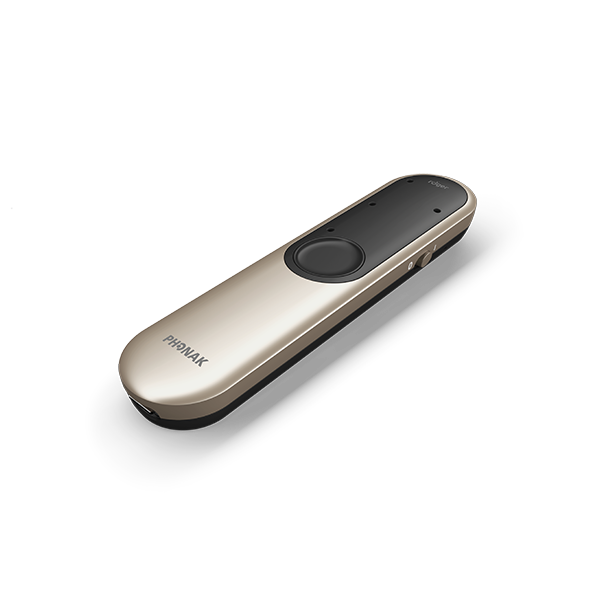
Most remote mics only work with the same brand as your hearing aids or CI, and often only with certain models. Check your exact model before you buy. The main exception is Phonak Roger, which works with almost any hearing aid or CI through a small add-on receiver.
| Brand | Remote mics | Works with |
|---|---|---|
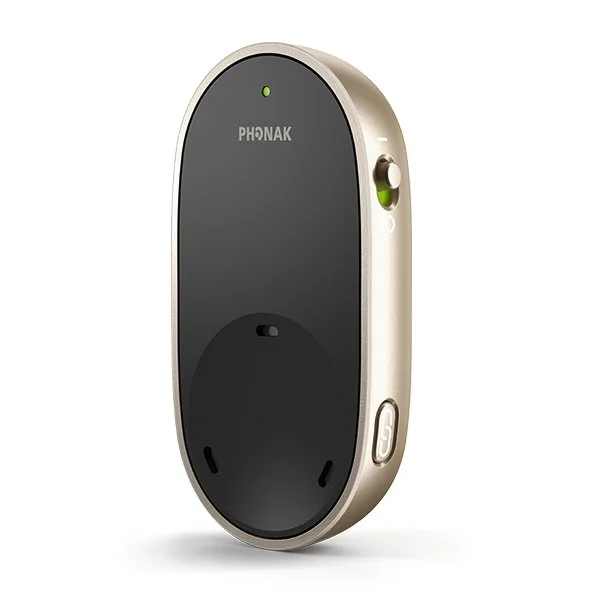
| Phonak | Roger On Sphere (new, November 2026), PartnerMic | Phonak hearing aids directly; most other brands and CIs with a Roger receiver |
| Oticon | ConnectClip, EduMic | Oticon hearing aids; Oticon Medical Ponto bone-anchored devices |
| ReSound / Jabra Enhance | Multi Mic, Multi-Mic+, Micro Mic | ReSound and Jabra Enhance hearing aids |
| Starkey | StarLink Edge Remote Microphone, StarLink Table Microphone, Remote Microphone+ | Starkey hearing aids (check by model) |
| Signia | StreamLine Mic | Signia Bluetooth hearing aids |
| Widex | Sound Assist | Widex Moment hearing aids |
| Cochlear | Wireless Mini Microphone 2+ | Nucleus 8, Nucleus 7, Kanso 2 and other Nucleus processors (Cochlear) |
| MED-EL | AudioLink, AudioLink XT | SONNET, SONNET 2, SONNET 3, and RONDO 3 processors |
| Advanced Bionics | Roger microphones and PartnerMic | Marvel CI streams Roger directly, with no extra receiver |
How to get a remote mic
Start with your audiologist. Most remote mics are sold through hearing care providers, and your audiologist can confirm which mic fits your devices. Some mics need to be paired or set up in fitting software. Ask for a demo or a trial period before you buy.
Know the price range. Brand-name clip-on mics often sell for about $250 to $500. Phonak Roger systems cost more.
Look for help paying. Depending on where you live and your situation, these may help:
Your health insurance plan or hearing aid benefit
Your child's school, through an IEP or 504 plan, for classroom use
Vocational rehabilitation, if you need it for work
Your CI manufacturer, which may include an accessory with a new processor or upgrade
Consider buying used. I bought a used remote mic on eBay, and it worked with my hearing aids. Used mics can save a lot of money, but they come with the risk of not working. Before you buy one, check these things:
The exact model, and that it's listed as compatible with your hearing aid or CI model (not just your brand)
Whether the seller includes the charger and cables
How the battery holds a charge
Whether you can pair it yourself or need your audiologist to do it
The return policy, in case it won't connect
Why every hearing aid and CI should come with one
In my opinion, a remote mic should be included with every pair of hearing aids and every cochlear implant. It shouldn't be an optional extra that people find out about years later, if at all.
Hearing aids and CIs are built to work best at close range. Yet the hardest places to hear are the restaurant, the meeting, the car, and the place of worship. Those are exactly the places remote mics are made for.
Just as important, audiologists should tell every patient that remote mics exist. Many don't mention them. A person can't ask for a tool they've never heard of. If you take one thing from this article, let it be this: ask.
Questions to ask at your next appointment
Bring these questions to your audiologist, or to your child's audiologist:
Which remote mics work with my hearing aids or CI?
Do they have a table or conference mode?
Can I try one before I buy it?
Does my insurance, school, or employer help cover the cost?
Can you pair it for me and show me how to use it?
A remote mic won't fix every hard listening situation. It can turn many of them from exhausting to easier.
Sources
Maximizing the Efficacy of the Widex Sound Assist Remote Microphone, AudiologyOnline
Roger On, Phonak
Widex Sound Assist user guide: remote microphone features, ManualsLib
Product Review: Phonak Roger On, The Hearing Coach
GN Multi-Mic+ Wireless Remote Microphone, HearingTracker Shop
Widex Sound Assist, Direct Hearing
Phonak Roger On, AudioSense
About Katherine
Hard of Hearing since childhood, Katherine S. Rybak spent 30 years in special education, nine of them as a Teacher of the Deaf and Hard of Hearing. Through Hearing Out Loud, she writes books for people with hearing loss and the people who love them, including the Hearing Empowered Kids series for children. See them all on my Books page.
Let's stay connected
I share real-life moments, tech I'm trying, and tips for living with hearing loss on Facebook and Instagram. Come say hi!
Want new articles like this in your inbox? Sign up for my email list just below.